
Human Resources Software
Staff Files 8.0 is the easiest way to manage employee information including time-off accruals, training records, and performance reviews.
HR software that stores over 900,000 electronic personnel files

Human resources software that’s fast, easy and proven!
Watch Our Video to See How Staff Files Can Help You
Staff Files is the easiest way to manage employee information. For over 15 years, Staff Files HR software has been helping businesses save time and become more organized. With a 90-day money-back guarantee, you can try it for yourself risk free.
What can you do with Staff Files human resources software?
- Store all employee information in one place
- Track an employee’s history at your company with ease
- Retrieve employee information quickly
- Secure confidential employee information to protect privacy
- Create HR documents, employee handbooks, office policies and job descriptions (Pro edition only)
- See who made changes to employee records in the Audit trail (Pro edition only)
Staff Files brings efficiency to managing employee information
Finally, a flexible HR software that simplifies the way you manage personnel files. With Staff Files' quick-tab navigation system, you can track all types of employee information in one location instead of sifting through folders and file cabinets.
Keep Personnel Records in One Place
Staff Files organizes data in virtual tabs to make personnel information easily accessible. Each tab contains fields and note areas for storing information for each of your employees. Staff Files tabs include:
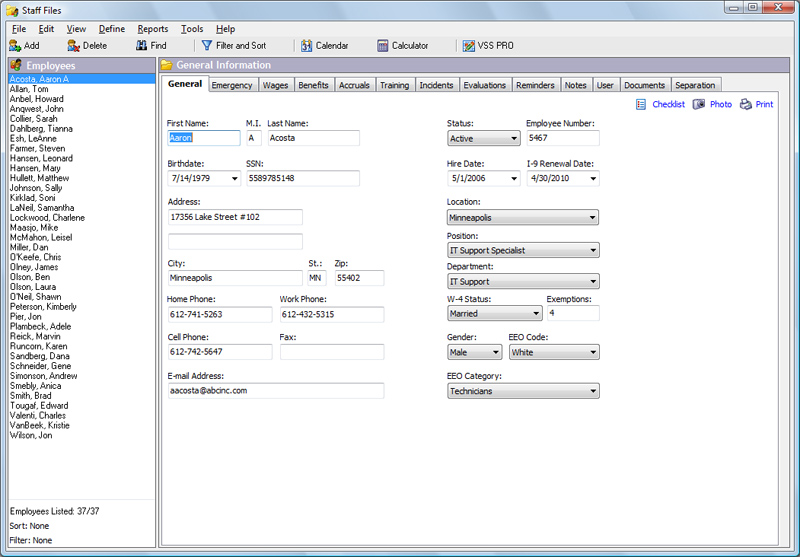
- General
- Emergency
- Wages
- Benefits
- Accruals and Time Off
- Training and Certification
- Incidents
- Performance Evaluations
- Reminders
- Notes
- User Defined Fields
- Documents
- Separation
 Keep Track of Accruals and Time Off
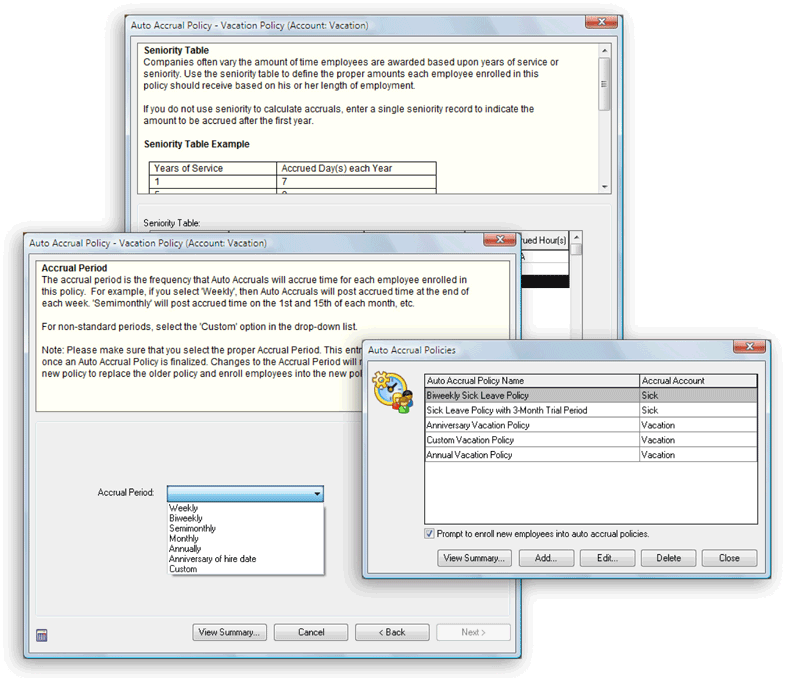
Staff Files keeps the answers to questions like "How much vacation time do I have left?" right at your fingertips. The Accruals tab tracks sick time, vacation time, personal leave, and any other time off accruals that you define by showing hours accrued, hours taken, and the balance remaining. Staff Files can also automatically calculate time-off accruals based on how your business works. The auto accrual policy wizard makes it easy to create accrual policies that will automatically add time to employee accrual accounts based on the answers you provide in the step-by-step wizard. And it's easy to view or print accrual policy settings at any time.
 Staff Files has Flexible Reports
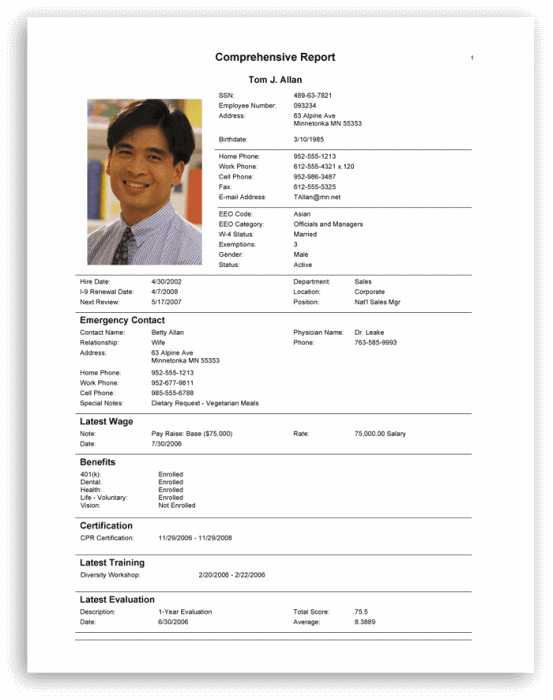
We understand each business is different. Flexible reporting and printing options let you retrieve information from Staff Files in easy-to-read formats. Professional reports, templates and letters are included, and you have the option to use data from the underlying Microsoft® Access database with external applications for advanced reporting capabilities.
 Keep Scanned Documents Together with Employee Information
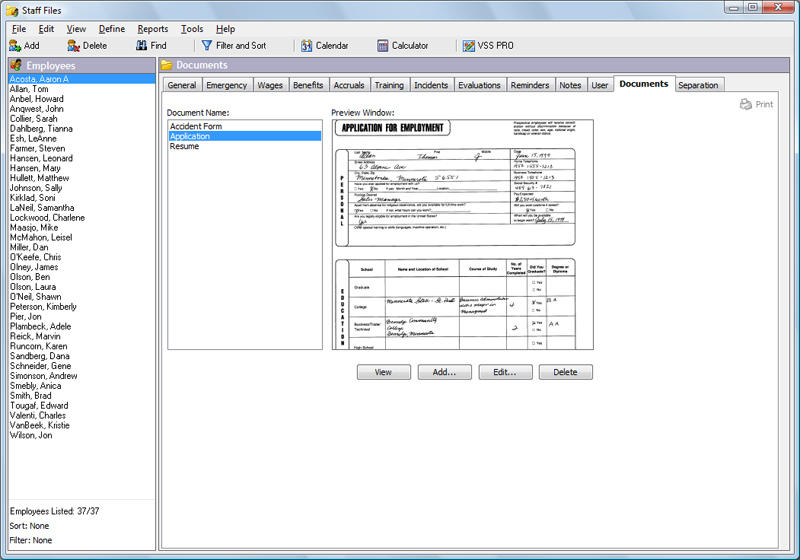
The Documents tab lets you keep even more in your electronic personnel records. Scan paper copies of documents you want to store and display in Staff Files like passports, applications, resumes, etc., or link to saved documents or images on your PC.
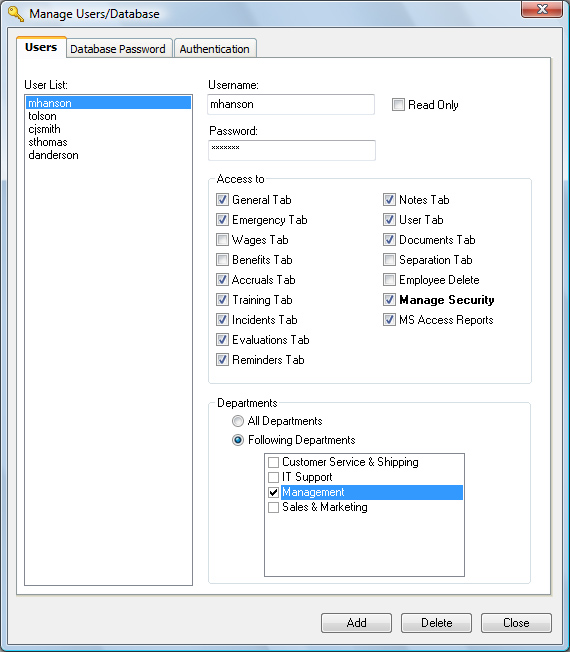 Staff Files Brings Security to Confidential Personnel Files
Staff Files' multi-level password system allows you to customize your own security levels, so you can control who has access to confidential information. The security settings let you restrict access to one or more tabs, or departments, or any combination of the two. You can allow read or write access to all tabs, or restrict access to sensitive information in tabs, such as Wages, Reminders, and Evaluations all together. You can also set manager access to view information for a particular manager's department only. Database passwords and read-only or data entry rights allow you to take security to the level you need.
HR software that helps you communicate to your staff and remember important dates
Improve communication with your employees by using reminders and pre-written HR letter templates. Create and customize your own employee letters using Microsoft Word, populate them with various fields from Staff Files, or edit any of the letter templates already included. Stay on top of the details with Staff Files' built-in reminder system which helps make sure you don't miss important dates, and notifies you when it's time to backup your database.
Multi-user licenses available
Does more than one person need access to Staff Files? Get a multi-user license and allow others to view or edit personnel records from any networked PC. With a Staff Files multi-user license, you can:
- Share your employee information with others (read/write or read-only access)
- Save time by giving each department manager access to the personnel information they need
- Eliminate questions by allowing department managers to view their departments’ sick time and vacation time balances
- Ensure your staff has the most up-to-date personnel records
System Requirements
- Microsoft Windows 2000/NT/Me/XP/Vista/Windows 7/Windows 8/Windows 10
- Microsoft Word 2000 or higher
- Adobe Reader 6.0 or higher
- Any printer and mouse supported by Windows 2000 or higher
- CD-ROM drive (if ordering a CD)
- Importing from QuickBooks requires QuickBooks Pro, Premier or Enterprise 2003 or later editions